


Plane Finder - Flight Tracker
4.6561.00 Reviews
App Specs
- Version
- 2026.6.1
- Updated On
- License
- Free
- Downloads
- 1,000,000+
- Developer
- pinkfroot limited
- Categories
- Travel & Local
- Platform
- Android, iOS
Screenshots

 Analysis by AppCompare
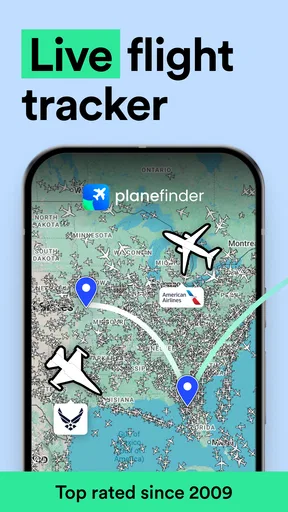
I tend to judge a flight-tracking app by one practical question: can I turn a moving dot on a map into useful context quickly? Plane Finder - Flight Tracker is built around that simple idea. Its live global map makes it easy to follow aircraft, then inspect a flight when curiosity turns into a more specific question. For me, that map is the main attraction—not just a visual display, but a way to connect what I see overhead with a route, an aircraft, and a journey in progress.
Following a flight, not just watching a map
A live aircraft map is most useful when it answers a question you already have. Is that plane heading toward a nearby airport? Is the flight I’m waiting for still on its way? What route is that aircraft taking? Plane Finder gives me a place to start: I can look across the map, select a plane, and explore the flight details rather than relying on a passing glimpse or a generic search result.
The distinction matters because a map full of moving icons can quickly become visual noise. I get more from the app when I use the map as a starting point and then narrow my attention to a particular aircraft or journey. The view is especially appealing if I enjoy aviation, but it also has a straightforward everyday purpose: checking a flight without having to know much about aircraft beforehand.
What the map helps me understand
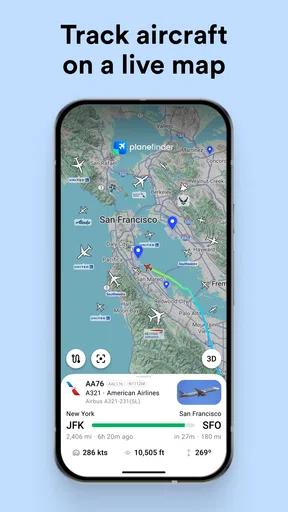
When I select an aircraft, the app can show details such as its flight number, origin, destination, speed, altitude, and aircraft type. That changes the experience from “there’s a plane up there” to “this is the flight and here’s where it is in its trip.” I find that useful for casual plane-spotting, but it also makes the map more practical when I’m following a particular journey.
The information is best treated as a live reference rather than a promise about what will happen next. A map can help me understand a flight’s progress, but I would still check with the airline or airport for decisions that depend on official travel updates. That distinction is worth keeping in mind when someone is waiting to collect a passenger: the tracker adds context, while an airport’s own information is the safer place to confirm arrangements.
Because the map covers flights worldwide, I can shift between a nearby aircraft and activity farther away. That breadth is part of the fun, though it also means the most useful way to explore is with a purpose. I might check an aircraft I can see from the garden, then search for a flight number when I want a particular answer, rather than trying to interpret every icon on the screen.
How I would use it during an ordinary day
Imagine I’m picking someone up later in the day. Instead of repeatedly wondering whether their plane has left or landed, I can look up the flight and follow its progress on the map. Seeing the aircraft’s route and destination gives me a clearer sense of the journey than a bare flight number does. If I’m simply curious about a plane crossing overhead, selecting it offers a different kind of answer: what aircraft it is and where it is travelling from and to.
Worth Reading Before You Choose

EA SPORTS FC Mobile 26 Is a Bigger Football Game, but It Takes Time

Flipboard Shows What News Apps Must Do Beyond the Feed

Switching to Android Auto Means Rethinking Your Driving Routine

Google Calendar Makes a Crowded Week Easier to Manage

Ludo King Makes the Most of the Minutes Between Plans

Baby Panda World Brings Quick Play to Modern Phones, but Its Game Library Feels Busy
Search is useful when browsing the map would take too long. The app lets me look by flight number, airline, or airport, so I can begin with whatever detail I already know. I’d use a flight number for a specific passenger journey, an airport when I want to see what is moving around a location, and an airline when I’m exploring its flights more broadly. That small choice of starting point makes the app easier to use than treating the map as the only way in.
Alerts can also help when I care about a specific flight but don’t want to keep reopening the app to check it. I see them as a convenience for following along, not a substitute for arranging a pickup or confirming a delay through official channels. For a short, casual look at the sky, I would skip setting one up; for a journey I’m actively keeping an eye on, an alert makes more sense.
Where it fits among flight apps
Compared with checking an airline’s app or an airport’s departure board, Plane Finder is more map-centred and better suited to understanding where an aircraft is in relation to its route. Airline and airport tools are often the more direct choice when I need a booking-specific update, terminal guidance, or information intended for passengers. Plane Finder’s strength is visual context: it lets me see the aircraft as part of wider air traffic rather than presenting only a travel itinerary.
That makes it a useful companion, not necessarily a replacement. If I only want to know whether my own flight is on time, an airline’s official channel may be quicker and more relevant. If I’m interested in several aircraft, want to identify a plane in the sky, or simply like following routes, a live map is a more engaging way to spend a few minutes. I would choose the tool based on the question, rather than expecting one flight app to do every airport and travel task equally well.
Plane Finder is a free Travel & Local app from pinkfroot limited, with optional in-app purchases priced from $1.99 to $19.99 per item. It is rated for Everyone, and its average rating is 4.5 from around 15,000 ratings, with more than 1 million installs. Those figures suggest it has found a sizeable audience, but the more useful point for me is that the basic idea is easy to understand: open the map, find a flight, and explore its details.
Useful habits, and limits worth knowing
For a cleaner view, I would begin by zooming toward the area I care about instead of trying to read the whole world at once. Then I’d select a single aircraft and use its route details to decide whether I want to keep following it. This is a more satisfying workflow than tapping randomly across a crowded map, especially when my goal is simply to identify one plane overhead. Searching by airport is another sensible approach when I’m interested in local traffic but don’t yet know a flight number.
There are trade-offs. A live map is engaging, but it asks me to interpret a moving picture, and that can be less direct than a simple arrival status. Detailed flight information can also be more than a casual user needs. If I’m trying to make a time-sensitive travel decision, I would verify it with the airline or airport instead of treating a tracker as the final authority. And if I have no interest in aircraft or routes, the map’s central feature may feel like an unnecessary extra step rather than a benefit.
It is also worth thinking about how I use alerts. They are most helpful when I already know which flight matters and want a prompt to check its progress; they are less useful if I am browsing without a specific journey in mind. Likewise, screenshots make sense when I want to share an interesting route or aircraft, but they do not replace a live view if the flight’s position changes. These are small choices, yet they keep the app focused on the task I actually opened it for.
The app has been around since September 2010 and is currently at version 2026.1.3, with iOS 11 as its minimum operating-system requirement. I would check that requirement before installing it on an older Apple device. It is also worth remembering that a flight tracker is not a substitute for travel planning: it can help me follow an aircraft, while booking details, airport procedures, and official passenger updates belong with the relevant airline or airport service.
Who will get the most from it
I’d recommend trying it if you regularly watch aircraft, travel often, or like having a visual way to follow someone’s flight. It is particularly appealing to people who enjoy asking small aviation questions—what plane is that, where did it come from, and where is it going? The map and the selectable flight details work together to make those questions easy to pursue without turning the experience into a technical lesson.
I would point a less frequent traveller toward an airline or airport app first if all they need is a clear status for one booking. I’d also suggest skipping Plane Finder if a live map feels distracting or if flight details are not something they would explore. Its value comes from wanting to look beyond a simple arrival time. It is not a travel organiser; it is a way to see and investigate aircraft in motion.
The app is available on iOS with a minimum requirement of version 11, and the current release is 2026.1.3. Since optional purchases are available, I would start with the free experience and decide whether I need anything beyond it before spending money. That keeps the decision simple: first see whether the live map and flight information suit the way you follow aircraft, then consider any extra purchase only if it serves a clear purpose.
Ever found yourself gazing at the sky, wondering where that airplane is headed? With Plane Finder - Flight Tracker, you can satisfy your curiosity and track flights with just a few taps on your smartphone. I’ve had the chance to dive into this app, and let me tell you, it’s quite the ride. Whether you’re an aviation enthusiast or just someone who travels frequently, this app could become your new best friend.
The First Impression
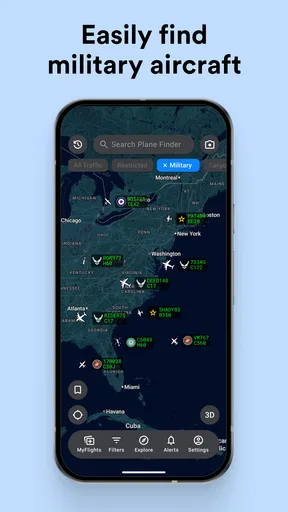
When you first open Plane Finder - Flight Tracker, you’re greeted with a sleek, user-friendly interface. No fluff, just straight to the point. The app presents a live map where you can see planes zooming across the globe in real-time. It’s almost hypnotic watching the tiny icons move, each representing a flight full of people on their own journeys.
One thing that caught my eye immediately was the level of detail. You can click on any plane to get a plethora of information: the flight number, origin, destination, speed, altitude, and even the aircraft type. It’s like having a mini control tower in your pocket. And, for those of you who love a little trivia, the app also provides historical data on flights, which is a neat touch.
Features That Stand Out
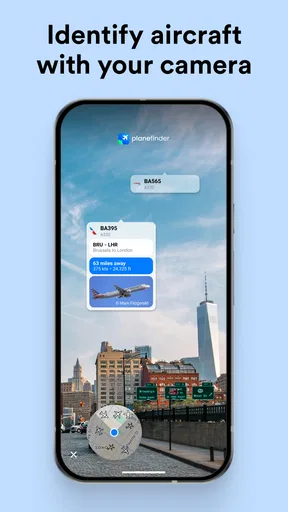
One of the standout features of the app is its augmented reality mode. Yes, you heard that right! You can point your phone at a plane in the sky, and the app will identify it for you. It feels like magic, and I can’t help but think this would be a hit at any airport or plane-spotting event.
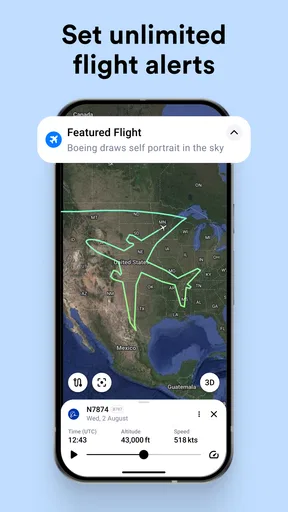
The search functionality is also top-notch. You can search by flight number, airline, or airport. I tried searching for a few flights I knew were en route, and the app pulled them up instantly. It’s quick, efficient, and, most importantly, accurate. Plus, you can set up alerts for specific flights, so you never miss an update.
For those who love to share their findings, the app allows you to take screenshots and share them directly from the app. It’s a small feature, but it’s those little conveniences that make a big difference.
The User Experience
Now, let’s talk about usability. Navigating through Plane Finder - Flight Tracker is a breeze. The developers have clearly put thought into the design, ensuring everything is intuitive. I didn’t find myself fumbling around, which is always a bonus when you’re trying to quickly check a flight status.
The app is highly responsive. Even when zooming in and out of the map or switching between different views, everything runs smoothly. No lag or crashes, just pure, uninterrupted flight tracking. That’s especially crucial if you’re tracking a flight that’s about to land or take off.
Why It’s Worth a Download
In a world where apps can often be cluttered with unnecessary features, Plane Finder - Flight Tracker keeps it simple, focusing on what matters most: providing accurate and detailed flight information. It’s a fantastic tool for those who travel frequently, work in the aviation industry, or just have a keen interest in planes.
Whether you’re tracking a loved one’s flight or just enjoying a lazy afternoon plane watching, this app transforms the experience into something interactive and informative. It’s like having a window to the world’s air traffic, right at your fingertips.
To wrap it up, if you’re someone who finds joy in knowing what’s happening above you in the skies, Plane Finder - Flight Tracker is definitely worth checking out. It’s informative, easy to use, and frankly, a lot of fun. So, next time you see a plane soaring above, you’ll know exactly where it’s going.
Pros
- Real-time flight tracking available.
- User-friendly interface for easy navigation.
- Detailed flight information provided.
- Customizable alerts for flight updates.
- Supports both Android and iOS devices.
Cons
- Premium features require a subscription.
- May consume significant battery power.
- Limited offline functionality.
- Occasional data update delays.
- Ads present in the free version.
FAQs for Plane Finder - Flight Tracker
What features does Plane Finder - Flight Tracker offer?
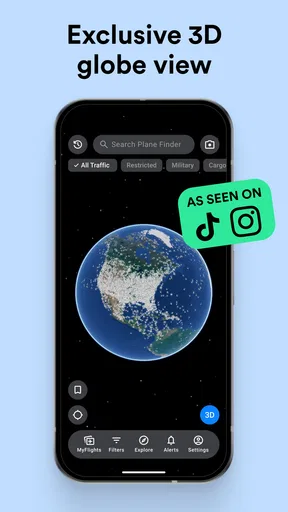
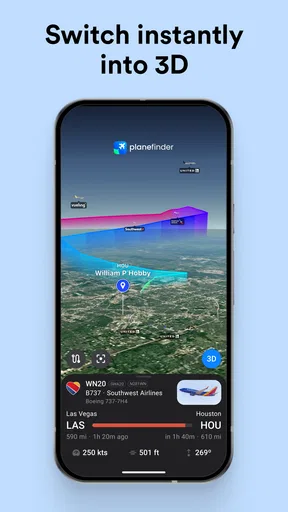
Plane Finder - Flight Tracker provides real-time tracking of flights globally. Users can view detailed flight information, including aircraft type, speed, altitude, and route. The app also offers 3D flight tracking, historical flight data, and the ability to set custom alerts for specific flights or airports.
Is Plane Finder - Flight Tracker available for both Android and iOS?
Yes, Plane Finder - Flight Tracker is available for download on both Android and iOS platforms. Users can find it on the Google Play Store for Android devices and the Apple App Store for iOS devices, ensuring accessibility across a wide range of smartphones and tablets.
Does the app require a subscription for full access?
Plane Finder offers a free version with basic features, but for full access to all features, including 3D tracking and historical data, users need to purchase a subscription. The premium version enhances the user experience with more detailed information and additional functionalities.
Can I track specific flights or airlines with Plane Finder?
Absolutely. Plane Finder allows users to track specific flights and airlines easily. By entering a flight number or airline name, users can receive real-time updates and detailed information about the flight's status, route, and expected arrival time, making it convenient for frequent travelers.
How accurate and reliable is the flight data in Plane Finder?
Plane Finder is known for its accuracy and reliability, using real-time data sourced from various aviation feeds and ADS-B receivers. The app is frequently updated to ensure that users receive the most current and precise information about flights, enhancing the tracking experience.


